

Webinar: OneView for Education
One view of your school's data, and an AI Agent your staff can ask.
A 45-minute session with Microsoft showing OneView for Education: your school's systems connected on Microsoft Fabric, ready-made student profiles and cohort reports on top, and the OneView AI Agent answering questions on that data in plain English.
What we'll cover in 45 minutes.
The session is mostly demonstration, on realistic data for a fictional school. The data foundation comes before the AI.
Where school reporting stalls
Why it stalls even when every system has a report button, and what has worked at schools that got past it.
OneView in practice
The education data model, a student profile and the cohort reports.
The OneView AI Agent
Questions answered on the data live, and a student summary drafted from the results.
Governance, with Microsoft
How Microsoft Fabric, Microsoft Entra ID and role-based access keep student data where it belongs.
Where to start
A practical sequence from one trusted view to AI-assisted decisions.
Your questions
Fifteen minutes. Bring the reporting question your school can't currently answer.
Every system in a school holds part of the picture. None holds the whole student.
Synergetic or TASS holds enrolments and attendance. Canvas or Schoolbox holds engagement. NAPLAN, PAT and pastoral platforms hold benchmarks and wellbeing. Each is useful on its own. None gives a leadership team the student's journey, or how a cohort is travelling.
So each new question from the Executive becomes a report to build, and the questions change faster than the reports can. The data already exists. Bringing it together is the work.
Where this shows up
- A Head of House works across three systems to prepare for one parent interview.
- Two reports show two attendance figures, and nobody is sure which is right.
- The Board pack takes days of senior leadership time, every term.
- A cohort question from leadership is answered the following week.
- The Board is asking for an AI roadmap, and the data underneath isn't ready for one.
One data model for the school, with reporting and an AI Agent on top of it.
OneView connects the systems a school already runs into a single education data model on Microsoft Fabric, within the school's own Microsoft environment. Nothing is replaced.
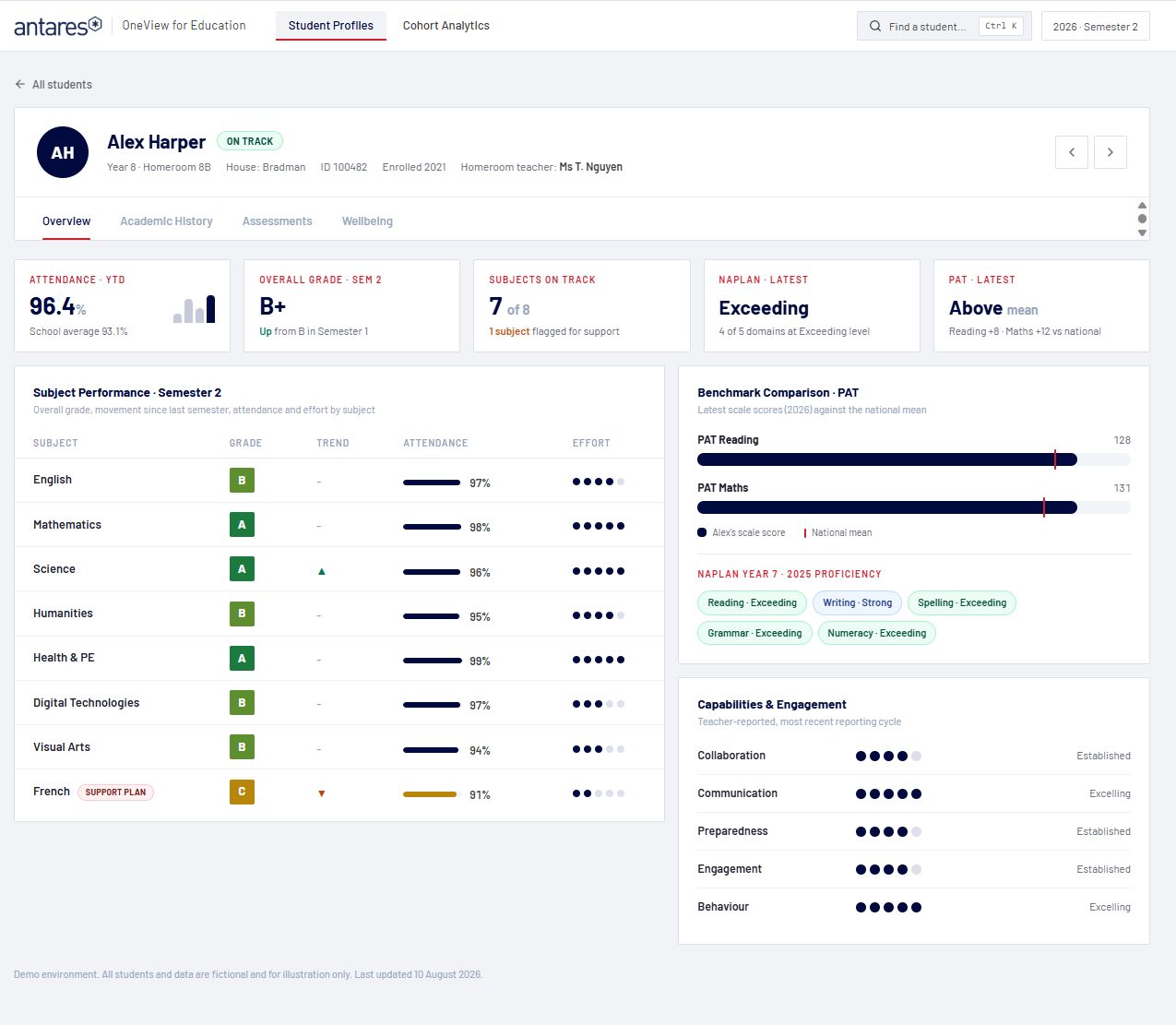
On that model sits a profile for every student, bringing together attendance, results, NAPLAN and PAT against the national mean, capabilities and wellbeing, and a set of cohort reports for the leadership team. Because every report draws on the same model, the attendance figure on a student's profile is the attendance figure in the cohort view.
For the questions no report was built to answer, the OneView AI Agent lets staff ask the data in plain English and receive an answer from the same source, under the same roles and permissions.
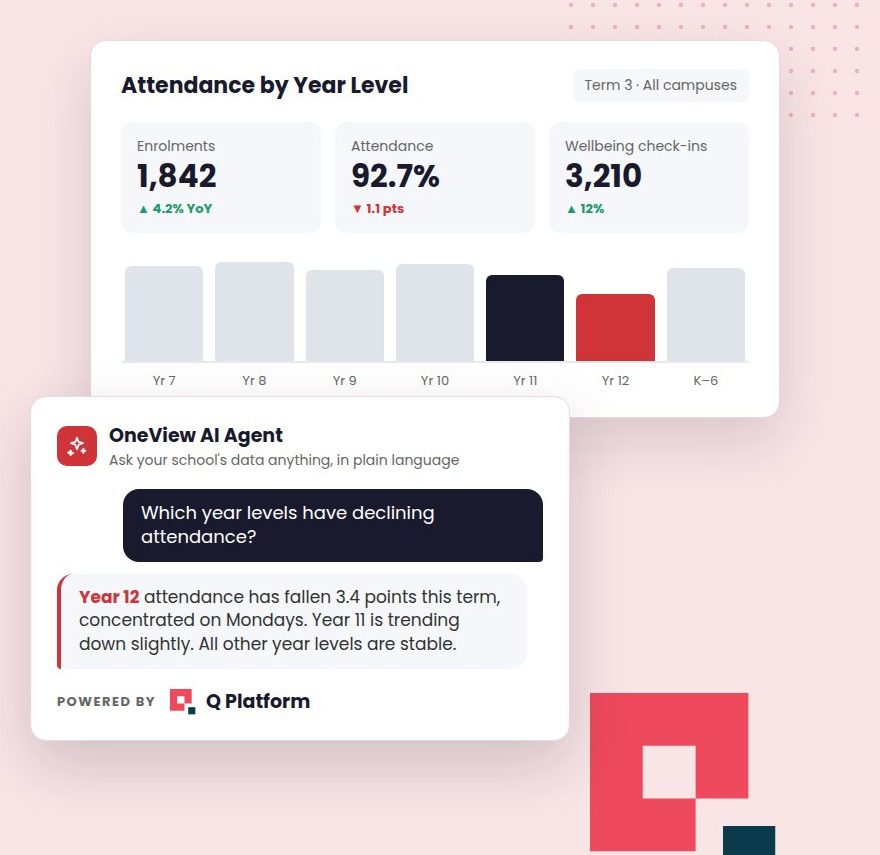
The OneView AI Agent, powered by Q Platform for Education.
Reports answer the questions a school anticipated. The OneView AI Agent answers the ones it didn't. Staff ask in plain English, and Q Platform's Auto-Select opens the appropriate specialist for the question, so nobody needs to learn prompting. Every question, answer and source is logged, and nothing leaves the school's tenancy.
Which year levels have declining attendance since Term 1?
10:32 AMThree year levels are trending down against Term 1. Year 8 is the one to look at first.
- Year 8: 94.1% to 90.3%, driven by Mondays and Fridays in 8B and 8D
- Year 10: 93.6% to 92.0%, spread evenly across classes
- Year 12: 91.8% to 90.9%, consistent with the same period last year
Source: Synergetic attendance, 1 Feb to 5 Sep 2026. Would you like this broken down by House or day of week?
10:32 AMDraft a two-paragraph summary of 8B for my meeting with the Head of Wellbeing tomorrow.
10:41 AMHere is a two-paragraph summary of 8B in your school's meeting-note format, drawing on attendance, PAT results and recorded wellbeing check-ins for the class.
- Attendance trend since Term 1, with the Monday and Friday pattern called out
- PAT Reading and Maths against the national mean
- Open check-ins and support plans, visible only to staff with the right role
Would you like a version for the parents of the students on support plans?
Open summary: 8B Wellbeing Meeting Notes.docx 10:42 AMWho the session is for.
School leaders and the people who build their reports. It isn't a technical deep-dive, though there is time in the questions for the Microsoft Fabric detail. Two or three people from the same school works well.
- Principals and Executive Leaders
- Business Managers and Directors of Operations
- IT Directors and Managers
- Heads of Learning and Teaching, Heads of Wellbeing
- Data and Analytics staff
Register.
Friday 25 September 2026, 11:00am AEDT, 45 minutes, online, free.
Registration is through Microsoft Teams. You'll receive a calendar invitation straight away and the recording afterwards. If the time doesn't suit, register anyway and the recording will come to you.
Or book a demo