

OneView for Education
A unified data platform for schools, built on Microsoft Fabric, with an AI Agent your staff can ask.
OneView brings your student information, learning, attendance, assessment and wellbeing systems together in Microsoft Fabric, inside your own Microsoft environment. It provides the student profiles and cohort reports school leaders rely on, and includes the OneView AI Agent, so staff can ask a question of the school’s data in plain English rather than waiting for a report to be built.
Antares works with these Australian education institutions




Most schools don’t have a data shortage. They have systems that don’t talk to each other.
Every platform in a school holds part of the picture. Synergetic or TASS holds enrolments and attendance. Canvas or Schoolbox holds engagement. NAPLAN, PAT and pastoral platforms hold benchmark and wellbeing information. Each gives real insight into a student. None gives executive, pastoral or academic leaders a single view of the student’s journey, or of how a cohort is travelling.
The data already exists, in the Microsoft and EdTech systems the school licenses each year. The difficulty is that each time leadership asks a new question, someone has to bring that data together by hand, usually in Excel, and usually over several days.
Where this shows up
- Pastoral preparationA Head of House or Year Coordinator works across three platforms to prepare for one parent interview.
- Conflicting numbersAcademic reporting shows one attendance and engagement trend; the SIS shows another. Staff stop trusting either.
- Executive reportingAssembling the Board or Council pack takes days of senior leadership time each term.
- Ad-hoc questionsA cohort-level question from leadership is answered with an ad-hoc report the following week.
- AI readinessThe Board is asking for an AI roadmap, and the school’s data is not yet structured or connected in a way that could support one.
One data model for the school, with reporting and an AI Agent on top of it.
The questions a leadership team asks this term will not be the questions it asks next term. OneView is designed around that. It connects the systems the school already runs into a single education data model on Microsoft Fabric, provides the core student and cohort reports from day one, and adds an AI Agent for the questions no report was built to answer.
Connect the systems you already run
OneView has ready-made connectors for Synergetic, TASS, Canvas, Schoolbox, NAPLAN, PAT and the wellbeing platforms most Australian schools use. Attendance, enrolment and results are defined once in the data model, so every report and every answer draws on the same figures. Nothing is replaced and nothing is migrated.
See every student’s journey in one profile
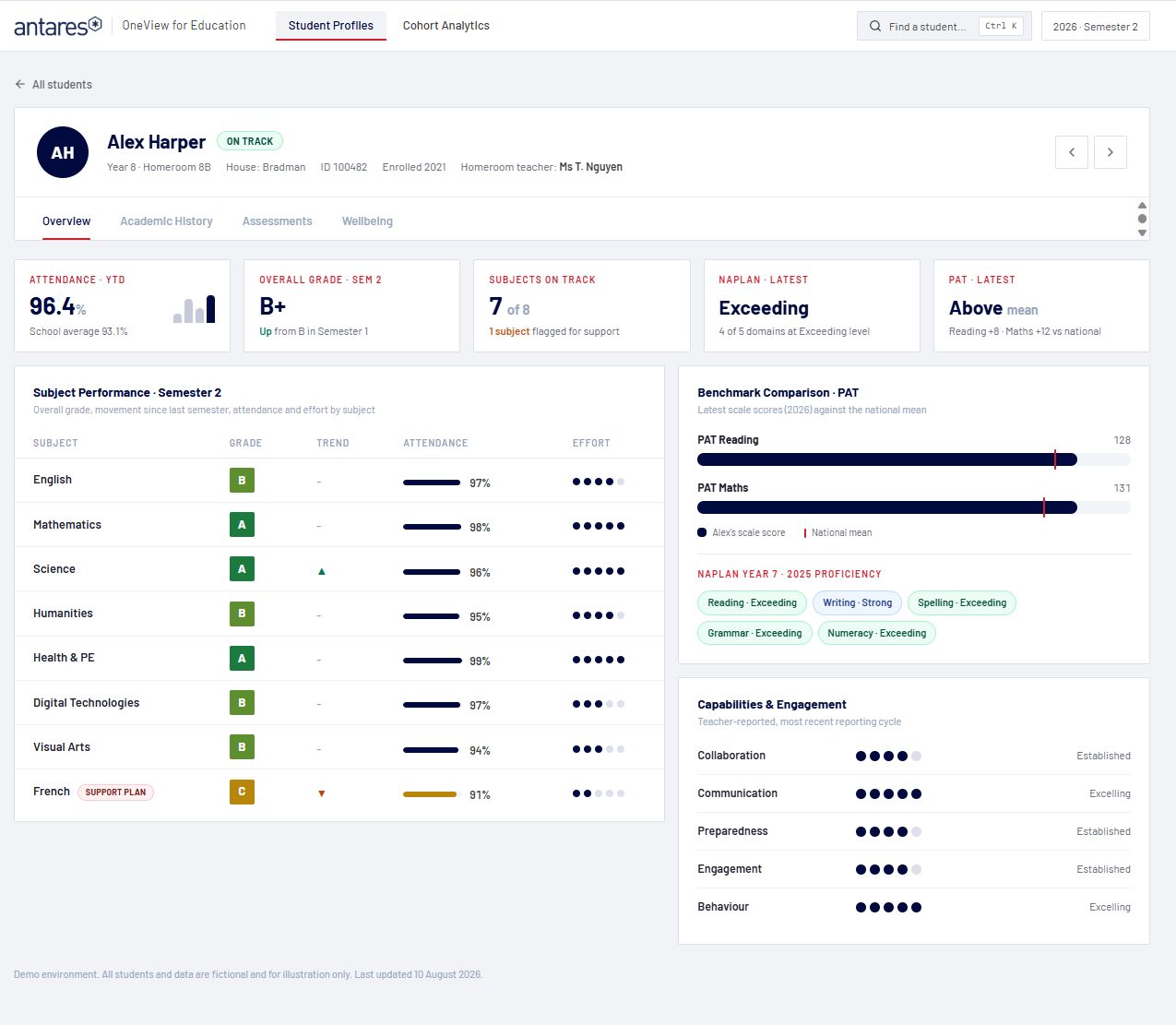
Each student has a single profile bringing together attendance, academic results and trend, NAPLAN and PAT against the national mean, teacher-reported capabilities, and wellbeing recognitions, check-ins and notes. The profile holds across every term and semester, including where subjects, timetables or grading structures have changed.
See how each cohort is travelling
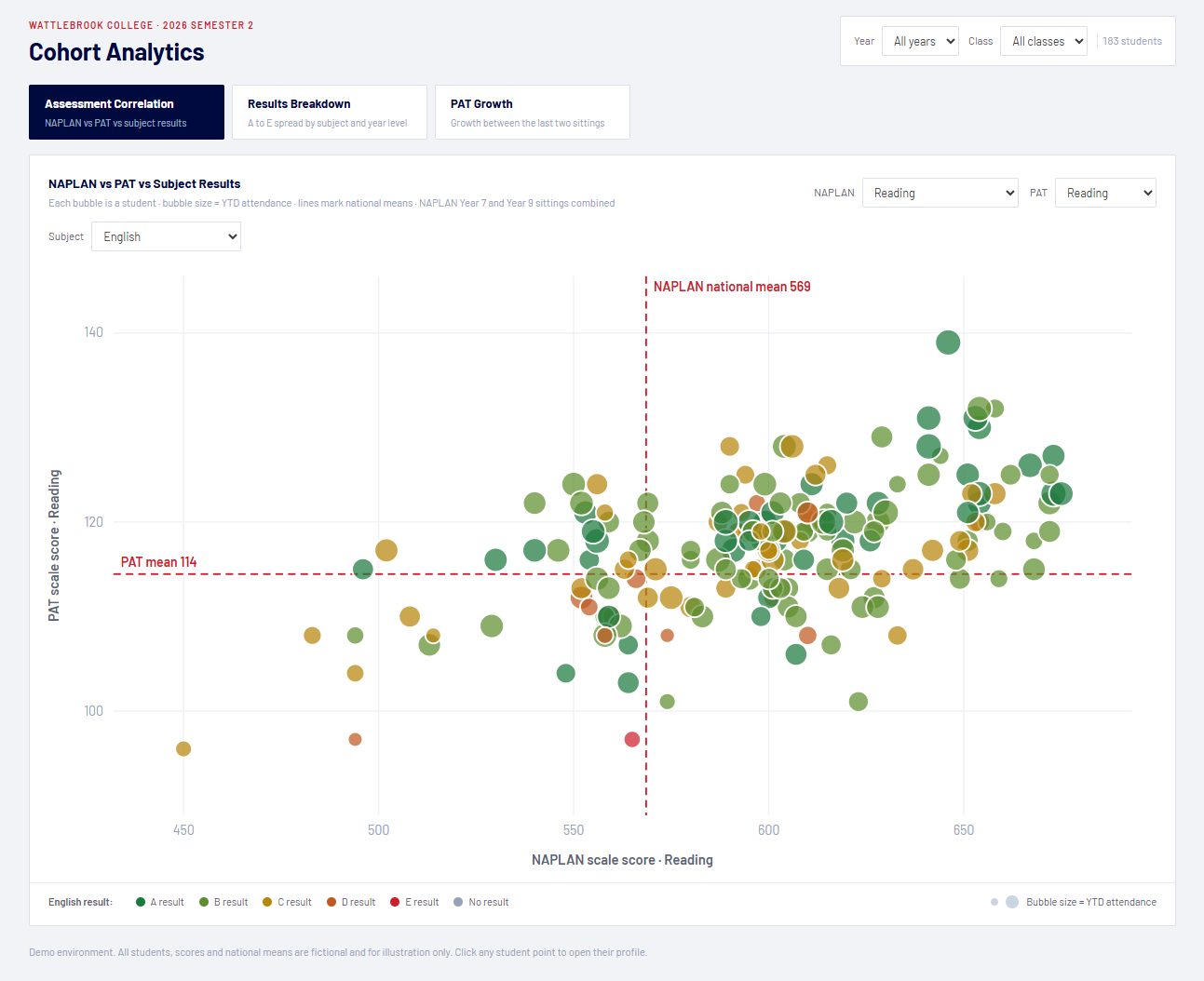
Leadership teams have a set of ready-made cohort reports: A to E distributions by subject and by year level, NAPLAN and PAT results mapped against subject marks, and growth between assessment sittings. Reports can be filtered by year level, house or class, and any student can be opened from the cohort view.
Ask the question no report was built for
When a leader asks something the reports do not cover, staff can put the question to the OneView AI Agent in plain English and receive an answer drawn from the same data model. The answer is consistent with the reports because it comes from the same source, and it is governed by the same roles and permissions. See it below
Ready-made reporting, all from the same model.
OneView ships with a profile for every student and a set of cohort reports for the leadership team, all running on the same Microsoft Fabric data model. The attendance figure on a student’s profile is the attendance figure in the cohort view.
- Student profile: overview, academic history, assessments and wellbeing, one page per student
- Assessment correlation: NAPLAN and PAT results against subject results, for every student in a cohort
- Results breakdown: A to E distribution by subject and by year level
- PAT growth: movement between assessment sittings, by student and by cohort
Reports can be filtered by year level, house or class, and used as they are or tailored to how your school reports.
See them in a demo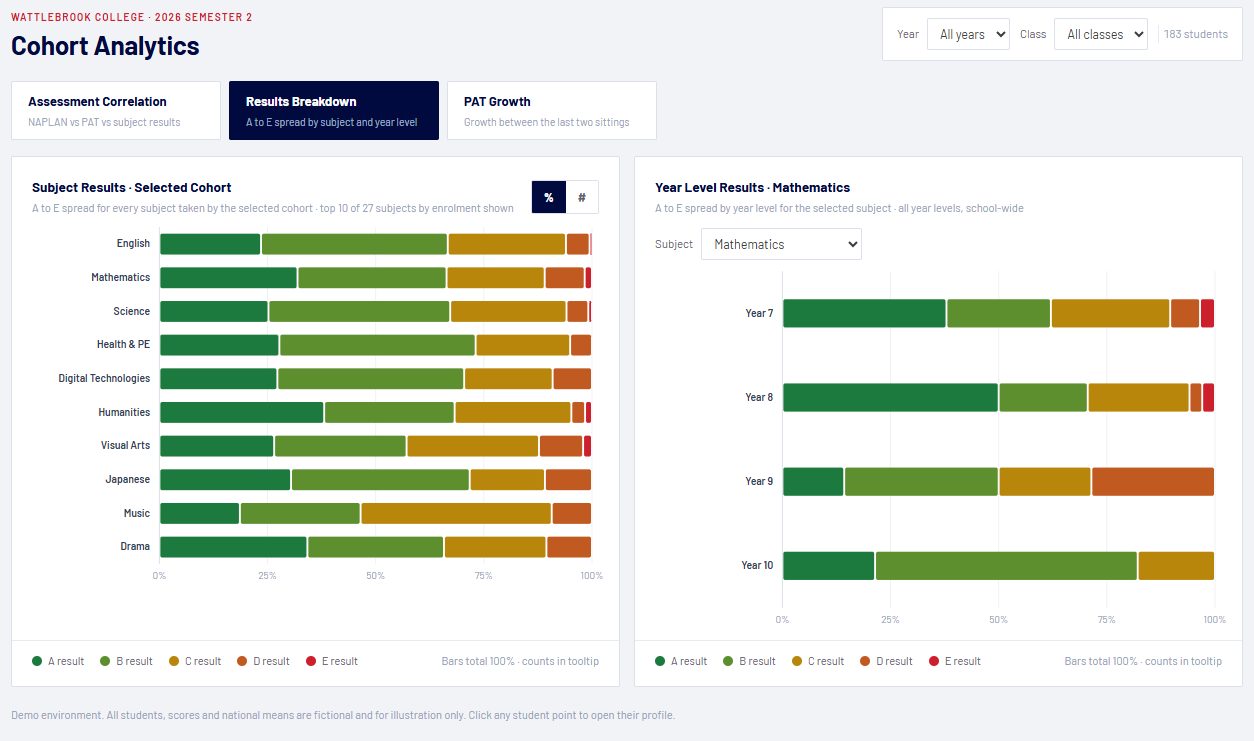
A way to ask the school’s data a question, rather than build another report.
Reports answer the questions a school anticipated. The OneView AI Agent answers the ones it didn’t. Staff ask in plain English and receive an answer grounded in the same Fabric data model the reports use, within the school’s own Microsoft environment.
Staff don’t need to learn prompting or choose a tool. Each specialist within the agent already understands its area, whether attendance, academic performance, or drafting student summaries and meeting notes, and Q Platform’s Auto-Select opens the appropriate one for the question asked.
Every question, answer and source is logged. Access follows the school’s existing roles: a Head of House sees their students, a Business Manager sees finance and staffing, and nothing leaves the school’s tenancy. The OneView AI Agent runs on Q Platform for Education, the same platform Haileybury uses across more than 150 staff, and does not require a separate AI product or licence.
Explore Q Platform for EducationWhich year levels have declining attendance since Term 1?
10:32 AMThree year levels are trending down against Term 1. Year 8 is the one to look at first.
- Year 8: 94.1% to 90.3%, driven by Mondays and Fridays in 8B and 8D
- Year 10: 93.6% to 92.0%, spread evenly across classes
- Year 12: 91.8% to 90.9%, consistent with the same period last year
Source: Synergetic attendance, 1 Feb to 5 Sep 2026. Would you like this broken down by House or day of week?
10:32 AMDraft a two-paragraph summary of 8B for my meeting with the Head of Wellbeing tomorrow.
10:41 AMHere is a two-paragraph summary of 8B in your school’s meeting-note format, drawing on attendance, PAT results and recorded wellbeing check-ins for the class.
- Attendance trend since Term 1, with the Monday and Friday pattern called out
- PAT Reading and Maths against the national mean
- Open check-ins and support plans, visible only to staff with the right role
Would you like a version for the parents of the students on support plans?
Open summary: 8B Wellbeing Meeting Notes.docx 10:42 AMBuilt on Microsoft Fabric, within your school’s environment.
The data model, the pipelines from each source system and the reports all run on Microsoft Fabric inside your school’s Microsoft tenancy, in Microsoft’s Australian data centres. The school owns the platform and the data. Antares operates it. Schools already on Microsoft 365 have most of the foundation in place.
Access controls built for a school.
Access is governed through Microsoft Entra ID. A classroom teacher sees their classes, a Head of House sees their students, and wellbeing entries are visible only to staff with the appropriate role. The AI Agent operates under the same controls, and every question and answer is audited.
Four steps to OneView in your school.
Demo
A 20-minute walkthrough of the student profile and cohort reports, with time to discuss how they would apply to your school’s systems. No preparation is required.
Data assessment
Antares reviews your source data, how each system can be connected and what your leadership team needs to know. You receive a written roadmap and a fixed-price proposal.
Implementation
Microsoft Fabric is established in your tenancy, the source systems are connected, and the student profiles and cohort reports are deployed. Most schools are live within weeks.
Ongoing service
OneView is operated as a managed service. Antares monitors the data pipelines, maintains the connectors as your systems change, trains staff, and adds reports and sources as your questions change.
Integrated data first. Everything else follows.
Schools are being offered AI from every direction. An AI asked “which students are falling behind?” on disconnected data will give a confident answer to the wrong question. OneView integrates the data first, so the reports and the AI Agent both draw on figures the school has already agreed are correct. That order is what makes the answers dependable, this term and next.
Expertise in Microsoft, data and the Australian education sector.
Antares has worked with Australian schools, universities and TAFEs for more than 18 years and has been delivering AI to education institutions since 2017. That experience spans Microsoft Fabric analytics and Power BI, institution-wide AI agents on Q Platform at Haileybury, Newington, UNSW and CQUniversity, and the LMS and SIS integrations that sit beneath them.
Antares holds Microsoft Specialisations in Analytics on Azure and Microsoft Fabric, Azure AI, Microsoft Copilot, and Adoption and Change Management, which is why OneView is delivered on Fabric, within the school’s own environment, with staff training as part of the service.
- Ready-made connectorsFor Synergetic, TASS, Canvas, Schoolbox, NAPLAN, PAT and A to E results, configured rather than built from scratch.
- A local teamConsultants in Sydney and Melbourne with experience in school leadership reporting.
- One platform and one roadmapReports now, the AI Agent alongside them, predictive indicators next, all on the same model.
- A managed servicePipelines monitored, connectors maintained, staff trained and reports extended, rather than a handover at go-live.
See OneView and the OneView AI Agent live with Microsoft. 45 minutes, mostly demo.
Thursday 22 October 2026, 11:00am AEDT [date TBC]. Register and we’ll send the recording if you can’t make it.
Book a demo.
A 20-minute online walkthrough on demo data. Complete the form and a member of the Antares education team will be in touch to arrange a time.
- No preparation required
- Bring a question your current reporting can’t answer
- No follow-up unless you ask for it
FAQs about OneView for Education
Synergetic, TASS, Canvas and Schoolbox out of the box, plus the attendance, assessment (NAPLAN, PAT, A to E) and wellbeing sources most Australian schools use. Other systems are connected during the data assessment.
No. OneView sits alongside the systems you already run and draws data from them into one model on Microsoft Fabric. Nothing is removed or migrated. If you are planning an SIS change, OneView keeps your reporting consistent through it.
In your school’s own Microsoft tenancy, in Microsoft’s Australian data centres. Access is role-based through Microsoft Entra ID. Wellbeing entries are visible only to staff with the right role.
The OneView AI Agent allows staff to ask a question of the school’s data in plain English and receive an answer from the same Fabric data model the reports use. It runs on Antares’ Q Platform for Education. Q Platform’s Auto-Select opens the appropriate specialist for each question, so staff do not need to learn prompting. Every question and answer is logged.
Copilot supports individual productivity inside Microsoft 365. The OneView AI Agent answers questions about your school’s operational data, governed by your school’s roles and permissions. Most schools run both.
The demo takes about 20 minutes. Following the data assessment, most schools have the integration, student profiles and cohort reports live within weeks.
OneView is operated as a managed service. Antares monitors the data pipelines, maintains the connectors as your systems change, trains staff, and works with you on new reports and the next stage of the roadmap.
Yes. New reports are built on the existing model rather than from scratch, and new sources such as finance or HR are added as connectors. A new question doesn’t become a new project.